

Description
Smart Tab Navigation for Chrome
Overview
The software is designed to streamline browser navigation by enabling intelligent keyboard shortcuts that direct users to existing tabs based on a "starts with" matching pattern. It addresses common inefficiencies in tab management, particularly in environments where users maintain multiple open tabs across different websites. The tool is especially beneficial for professionals who rely heavily on web-based workflows, such as developers, digital marketers, and content creators, as it reduces time spent searching through open tabs.
By supporting system-level Chrome shortcuts like chrome://extensions and chrome://apps, the application enhances access to internal browser features without requiring manual navigation. This functionality is ideal for users working in fullscreen mode, where minimizing distractions and maximizing screen real estate are priorities. The software operates as a lightweight extension integrated with the Chrome browser, making it suitable for both casual and advanced users seeking faster access to frequently visited web destinations.
While the developer did not provide additional background information, the application’s focus on efficient tab handling suggests a targeted approach to improving productivity within web-based ecosystems. Real-world usage scenarios include quickly switching between project management tools, reference sites, and development environments, all without disrupting workflow continuity.
Key Features & Capabilities
- Smart Shortcut Logic: Shortcuts only activate if a tab with a URL starting with the specified string already exists. This prevents duplication of tabs and ensures efficient navigation.
- Full-Screen Optimization: Designed to work seamlessly in fullscreen mode, maintaining usability even when screen space is limited.
- System Shortcut Support: Compatible with Chrome’s internal URLs such as
chrome://extensionsandchrome://apps, enabling quick access to browser settings and tools. - Pattern-Based Matching: Uses a "starts with" algorithm to match shortcuts to existing tabs. For example,
https://www.google.comwill openhttps://www.google.com/contactsif it's already open. - Non-Duplicative Behavior: If a tab matching the shortcut already exists, the software will navigate to it instead of creating a new one. This reduces clutter and improves workflow efficiency.
These features are particularly useful in high-productivity environments where users manage dozens of tabs simultaneously. For instance, a developer might use https://github.com to jump to an existing GitHub repository tab, avoiding the need to search through multiple open windows. Similarly, a marketer could use https://analytics.google.com to access their analytics dashboard instantly, without manual navigation.
User Interface, Workflow & Performance
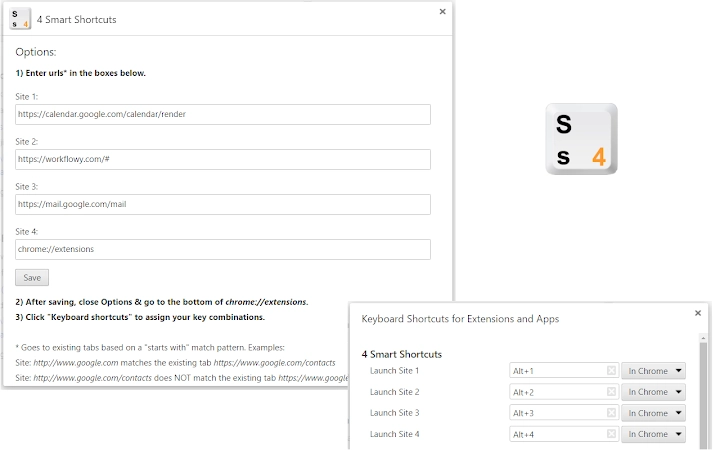
The software integrates directly into the Chrome browser environment, operating without a standalone interface. Users interact with it exclusively through keyboard shortcuts, which are configured within the browser’s extension settings. This minimalistic design ensures that the tool remains unobtrusive and does not interfere with the browsing experience.
Navigating between tabs using the shortcut system is intuitive and efficient. The workflow relies on memorized or predefined key combinations, allowing for rapid access to frequently used web pages. The application’s performance is expected to be lightweight due to its small file size and focused functionality, though exact resource usage details were not specified.
Stability appears to be a core design goal, as the software avoids redundant actions such as opening duplicate tabs. This contributes to a smoother browsing experience, especially during extended sessions. The developer did not provide additional performance metrics or CPU/RAM behavior data, but the low installation size suggests minimal system impact.
Compatibility & System Requirements
The software is compatible with Windows, Mac, and Linux operating systems, making it accessible across major desktop platforms. It functions as a Chrome browser extension, requiring the Chrome browser to be installed and up to date.
The installation size is 1.5 MB, indicating a lightweight footprint that should not significantly affect system performance. The software version is 1.0.1, released on June 15, 2024. Exact system requirements were not listed, but the broad OS support suggests it is designed for general desktop use.
Platform compatibility information is limited to the supported operating systems and the browser dependency. No additional hardware specifications were provided, so users should ensure their system meets standard Chrome browser requirements for optimal operation.
Pros and Cons
Pros
- Efficient tab navigation using smart shortcut logic
- Prevents duplicate tabs with "starts with" matching
- Optimized for fullscreen browsing environments
- Supports internal Chrome system URLs like chrome://extensions
- Lightweight at 1.5 MB with broad OS compatibility
Cons
- No standalone interface or visual feedback for shortcut execution
- Dependent on Chrome browser for functionality
- Exact performance impact on CPU/RAM not disclosed
- Limited to Chrome-based browsers; no support for Edge, Firefox, etc.
- Requires manual shortcut configuration within browser settings
FAQ Section
Is the software compatible with all major operating systems?
Yes, the software is compatible with Windows, Mac, and Linux operating systems.
Can I use this tool with browsers other than Chrome?
No, the software is designed specifically for the Chrome browser and does not support other browsers such as Firefox or Edge.
Is the software safe to use with sensitive websites?
The software operates within the Chrome extension framework and does not access or store user data beyond what is necessary for tab management. It does not collect browsing history or personal information.
How often are updates released?
Updates are released as needed. The current version is 1.0.1, released on June 15, 2024.
Is the software free to use?
Yes, the software is completely free to download and use.
Final Thoughts + CTA
Smart Tab Navigation for Chrome delivers a focused, efficient solution for users seeking faster access to open web pages. Its intelligent shortcut system prevents tab duplication and enhances workflow continuity, particularly in fullscreen or multitasking scenarios. The support for Chrome’s internal URLs adds value for advanced users who frequently access browser tools.
While it lacks a visual interface and is limited to Chrome, its lightweight design and broad OS compatibility make it a strong choice for productivity-focused individuals. The tool is ideal for developers, marketers, and knowledge workers who manage multiple web-based tasks daily.
Download Smart Tab Navigation for Chrome now.
Guides & Tutorials for 4 Smart Shortcuts Extension for Chrome
How to install 4 Smart Shortcuts Extension for Chrome
- Click the Preview / Download button above.
- Once redirected, accept the terms and click Install.
- Wait for the 4 Smart Shortcuts Extension for Chrome download to finish on your device.
How to use 4 Smart Shortcuts Extension for Chrome
This software is primarily used for its core features described above. Open the app after installation to explore its capabilities.
User Reviews for 4 Smart Shortcuts Extension for Chrome 0
No reviews found





